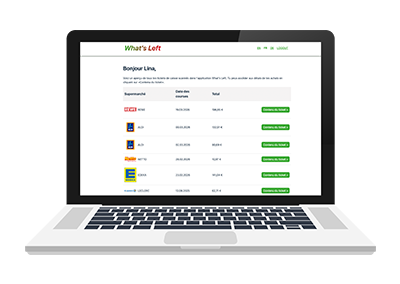
After a long break, What’s Left is back! While we’re restructuring the mobile app, you can already enjoy a new feature by exporting your receipts in CSV format.
We put the app aside for a while, caught up in our professional and personal lives. Yet the What’s Left project has always remained close to our hearts, and we’ve always wanted to come back to it. Today, that moment has arrived: the project is relaunched! On one hand, we’re completely reworking the mobile app—from its architecture to its performance—to provide an improved user experience. On the other hand, we’ve taken your feedback into account, especially your main request: the ability to export your receipts. Good news—it’s now possible! This new feature is already available in our web app: hello.tellmewhatsleft.de!
For existing users
Go to hello.tellmewhatsleft.de and log in using the username and password you use in the mobile app. Once logged in, you’ll see a list of all your receipts scanned via the mobile app.
- Click on “Receipt Details” to access the digital version of a receipt
- Within the receipt details, you’ll find detailed nutritional information per product, if you’ve also scanned your items in the mobile app
- Use the “Export CSV” button to download your data in CSV format
For new users
- Create an account from the mobile app to start using it
- Scan your receipts
- Access your receipts on hello.tellmewhatsleft.de
Some receipts are missing ?
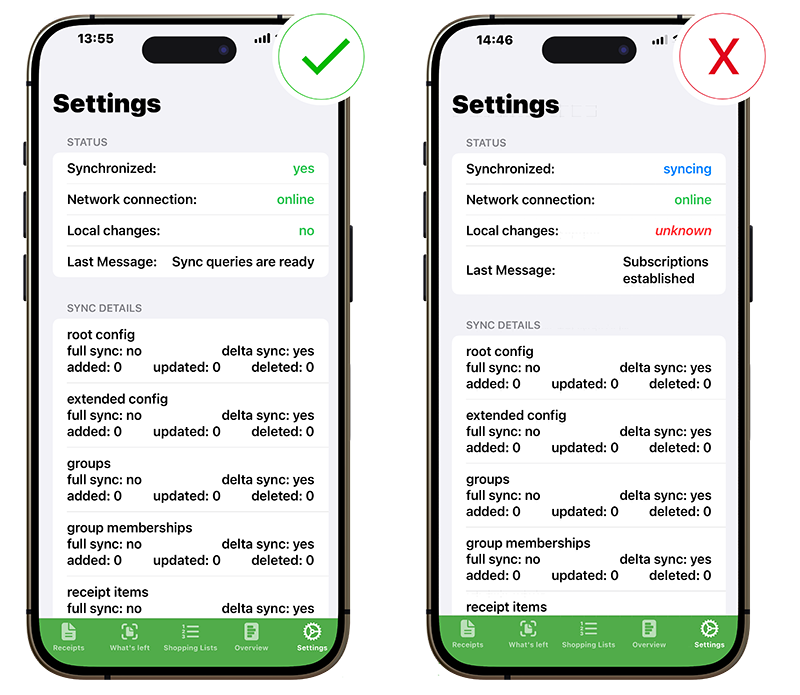
This is a synchronization issue (which we are currently working on and will be addressed in an upcoming update). Your phone data hasn’t been fully synced yet. To fix the issue, open the mobile app and go to Settings. Make sure all three statuses are checked:
- Synchronized: yes
- Network: online
- Local changes: non
The synchronization may take from a few seconds to a few minutes. If nothing happens, simply reopen the app and wait for the statuses to update.
We look forward to your feedback! Don’t hesitate to reach out with any questions or comments: info@tellmewhatsleft.de